# Description

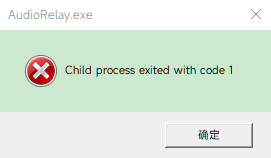
AudioRelay crashes with the popup error "AudioRelay.exe: Child process exited with code 1" when the audio output
device (e.g. a Bluetooth TWS earphone) disconnects, sleeps, or is removed.
According to the generated `hs_err_pid54220.log`, the crash is caused by an `EXCEPTION_ACCESS_VIOLATION
(0xc0000005)innative-rtaudio.dllduring cleanup. When the audio device disconnects, the stream stops and the application attempts to destroy the audio session viaRtAudioJni.destroy(), which triggers a null-pointer dereference (reading address 0x0000000000000000`):
```text
Problematic frame:
C  [native-rtaudio.dll+0xf5f1]

Java frames:
j  com.azefsw.audioconnect.audio.RtAudioJni.destroy(J)V+0
j  com.azefsw.audioconnect.audio.RtAudioJni.destroy()V+23
Prior to the crash, audiorelay.log records:
[WARN] System error: SystemErrorId(value=RTAUDIO_STREAM_STOPPED_ERROR)
[ERROR] Audio output failed: com.azefsw.audioconnect.desktop.exceptions.StreamNotRunningException: The stream
stopped running. The audio device changed or was removed
[WARN] System error: SystemErrorId(value=RTAUDIO_OUTPUT_ERROR)
Steps to reproduce
- Start AudioRelay on Windows 10.
- Select a Bluetooth audio device (e.g. TWS earbuds) as the audio output.
- Start audio playback or streaming.
- Disconnect the Bluetooth earphones (or put them back in the charging case, or let them enter auto-sleep after
silence). - AudioRelay crashes immediately with the dialog: Child process exited with code 1.
Devices
Device A:
Windows 10 Pro 64-bit (Build 19041)
AudioRelay 0.27.5
Device B:
Bluetooth Audio Device (TWS Earbuds)
──────
Attachments uploaded:
• hs_err_pid54220.log
• audiorelay.0.log
• error_popup.png
audiorelay.0.log (75.8 KB)
hs_err_pid54220.log (59.7 KB)