I’m using Audio Relay to stream my laptop audio to my phone. It works fine while connected, but if I stop Audio Relay from the phone (instead of from the laptop), the video on my laptop keeps playing but there’s no sound.
When I check my audio settings in Windows, it’s still set to “Audio Relay Virtual Audio Device” as the default output, so the sound isn’t going to my laptop’s built-in speakers. I have to manually switch it back every time.
It would be great if Audio Relay could automatically return to the previous audio device (e.g., laptop speakers) when the phone disconnects, so we don’t lose audio.
Is there a setting for this, or could it be added in a future update?
Hi, I’m using AudioRelay with BlackHole as my virtual device.
It would be great if the app can automatically switch the output device to BlackHole on connection and then switch back to MacBook Speakers on disconnection. (instead of doing it manually from audio midi setup)
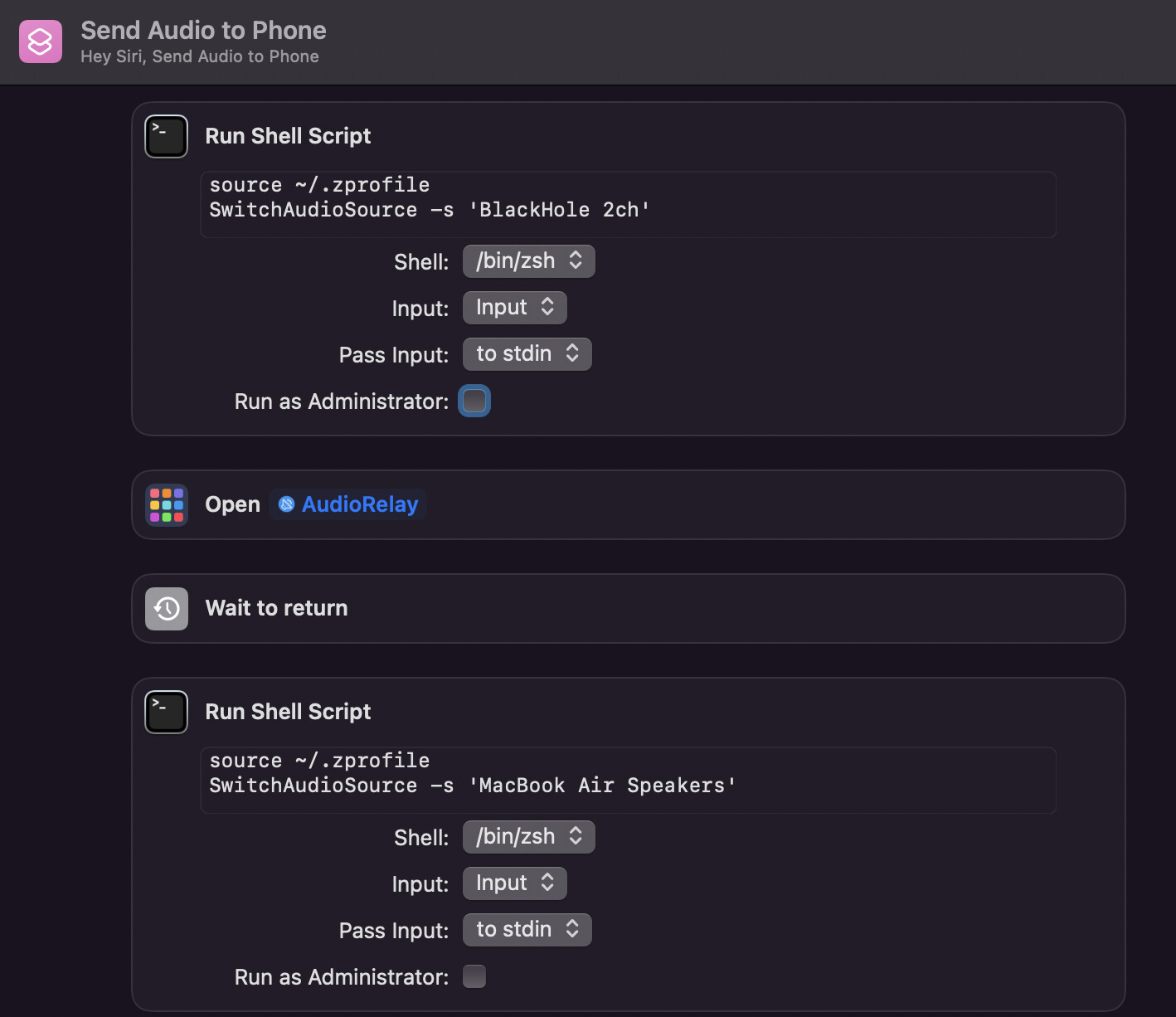
I am currently using an utility called switchaudio-osx and Shortcuts to automate it on starting and closing the app
This is what my shortcut looks like. The problem is that I can’t switch to MacBook speakers automatically when my phone is disconnected and I’ll have to close the AudioRelay app to do so.